
How to use the Auckland Council GeoMaps and Auckland Unitary Plan.
Across New Zealand, District Plans set the rules for what can be built, where, and under what conditions. While the purpose is similar everywhere, each council presents its District Plan information slightly differently.
In this article series, we break down how to find and use key planning information for different councils, focusing on where to start and what matters most when you are checking development potential for a property.
You can also read our other guides in this series:
- Christchurch City Council – click here
- Selwyn and Waimakariri – click here
- West Coast (South Island) – click here
Understanding what you can (and can’t) do with a piece of land in Auckland starts with two essential tools: the Auckland Council GIS Map and the Auckland Unitary Plan Viewer. These online maps provide critical information about zoning, overlays, and site-specific features that influence development potential.
This guide walks you through how to use both tools effectively, whether you’re planning a subdivision or development, assessing feasibility, or simply doing due diligence.
Start with the Right Tools
You’ll primarily use:
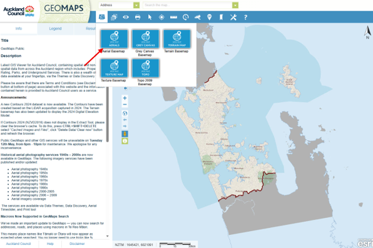
- Auckland Council GeoMaps (GIS Map) – best for aerials, property boundaries, infrastructure and site features.
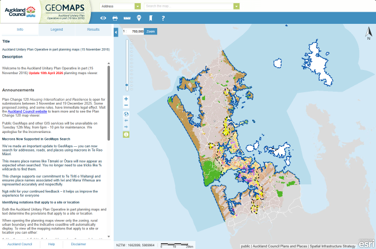
- Auckland Unitary Plan Viewer – the planning rulebook with zoning and overlays.
Both maps should be used together. GeoMaps gives the spatial context of a property; the Unitary Plan Map tells you what the relevant provisions are for the site.
Finding Your Site
Enter the property address or use the legal description (Lot/DP) in the search bar. Once located, you can switch to aerial view if needed for context (Geomaps only).
Check the Zone
This will be your starting point when using the Unitary Plan map.
Zoning determines for what activities are expected in an area. Residential zones allow housing, industrial zones allow industry, and commercial zones support business activities.
In Auckland, you’ll see a zoning label such as:
- Residential – Single House Zone
- Residential – Mixed Housing Urban
- Residential – Terrace Housing and Apartment Buildings
- Business – Light Industry
- Business – Mixed Use Zone
Each zone has specific rules relating to building height limits, site coverage, setbacks, on-site amenity (outlook space and outdoor living space) and subdivision.
Knowing your zone helps you understand the council’s requirements and anticipated outcomes of the area.
Look for Overlays and Precincts
The second step is to check any overlays or precincts on your property using the Unitary Plan map.
Overlays and precincts are additional planning layers that apply to specific locations and may introduce extra rules or constraints beyond the zoning rules. These are critical and often overlooked.
In Auckland, common overlays include:
- Special Character Areas
- Heritage Overlays
- Locally or Regionally Significant Viewshafts
- Flood Plains / Flood Sensitive Areas
- Stormwater Management Areas
- Coastal Inundation Zones
- Significant Ecological Areas (SEA)
- Outstanding Natural Landscapes
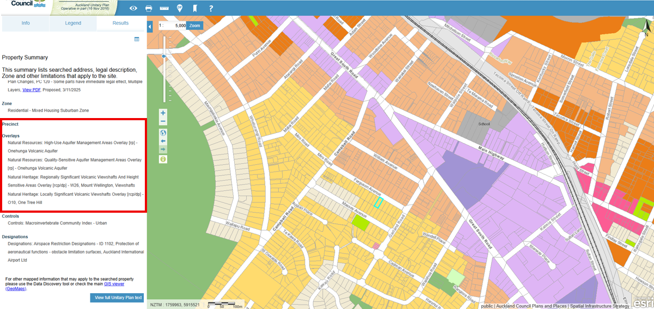
A property might sit comfortably within a residential zone, but an overlay or a precinct could still affect what can be built or how development needs to be designed.
This is why planners often say that zoning is only part of the story.
Indentify Site Features
Switch to Auckland Council GeoMaps for this step. Turn on layers under the “Assets” tab, such as:
- Catchment and Hydrology (rivers, overland flow paths, flood plains etc)
- Underground Services (stormwater, wastewater and water supply)
- Contours
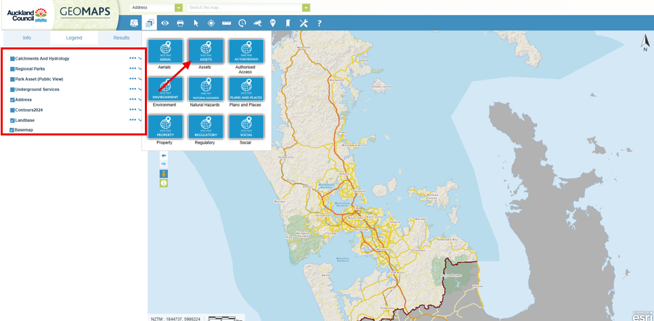
Site features determine the feasibility and costs for development. For example, steep contours could mean more earthworks and retaining walls compared to a flat land. If overland flow path or floodplain is present, parts of the site may become undeveloped or add design complexity - there are relevant hydrological provisions in the Auckland Unitary Plan provisions associated with this. If services are far away from the site, infrastructure costs rise.
Find the Relevant Rules
Once you know the zone and overlays, you can then go into the Auckland Unitary Plan (Operative in Part) (AUP(OP)) Plan itself and look at the rules that apply. The most commonly used chapters are:
- Chapter H Zones – A zone chapter with development control standards
- Chapter E Auckland-wide – This chapter has the standards applicable to all Auckland areas, for example, earthwork, transportation, natural hazard and subdivision rules.
- Chapters for specific overlays or precincts
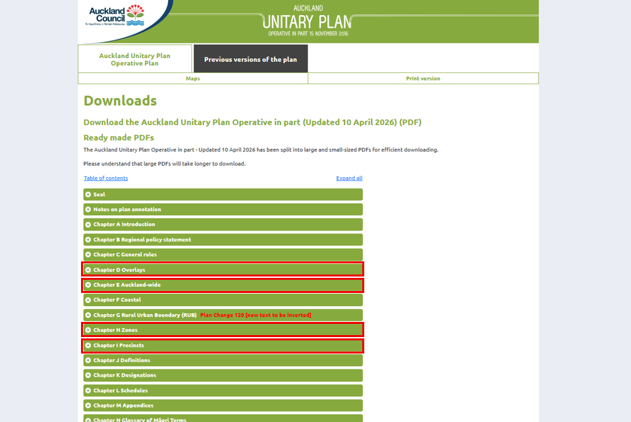
At this stage, you will be looking for the activity tables and the development control standards under each chapter.
Activity Status
Each chapter includes an activity status table:
- Permitted (P) - No resource consent required (if all standards are met)
- Controlled (C) / Restricted Discretionary (RD) - Consent required, but limited scope
- Discretionary (D) / Non-complying (NC) - Consent required, higher risk and more complex
- Prohibited (Pr) - Not allowed
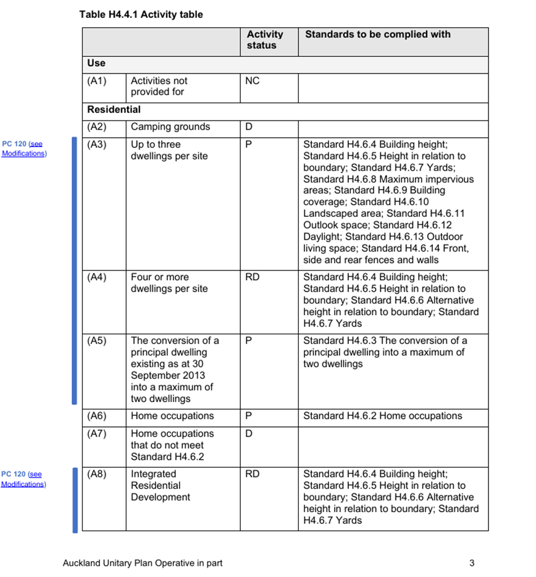
Note that the activity is only valid if you meet all the development standards.
Development standards can be found in the later parts of the chapter and generally comprise (using the zoning chapter as an example):
- Maximum building height limit
- Site coverages
- Yard setbacks
- Height in relation to boundary (HIRB)
- Outlook space
- Outdoor living space
- Fence height
- Density controls
-
If any of the standards are breached, the activity usually changes (e.g. from permitted to restricted discretionary). This means a resource consent is required.
Even for planners, the AUP(OP) can take time to navigate.
Many rules interact with each other, and sometimes the answer to a simple question like “Can I build another house on my section?” depends on a combination of zoning, overlays, and Auckland-wide rules.
Online maps are a great starting point, but understanding how the rules apply to a specific site or if a proposal requires a resource consent often requires looking at the Auckland Unitary Plan (Operative in Part) as a whole.
If the rules start to feel a bit too technical, that’s usually the point where speaking with a planner can save you time, uncertainty, and potentially costly mistakes.
If you are exploring what you might be able to do on your property and would like planning advice, feel free to get in touch with our team. We’re always happy to have an initial conversation and help you understand the planning framework that applies to your site.
At Inovo, our multidisciplinary team includes planners, surveyors, engineers, and project managers who can support projects from early feasibility through to design, consenting and delivery.
Was this article helpful? Here’s some other topics that might be of interest to you:
National Policy Statement for Natural Hazards (2025): What developers and landowners need to know
What’s the difference between as resource consent and a building consent?
Disclaimer
This article contains general information and opinion based on our expertise. It is provided free of charge and does not constitute legal or other professional advice. The information within it was up to date at the time of publishing.
Have you got further questions about this topic or our other services?
We are always happy to help – drop us an email rmplanning@inovo.nz, or phone us on 020 4000 0294.
.png)